http://kb.vmware.com/selfservice/microsites/search.do?language=en_US&cmd=displayKC&externalId=2060019
Thursday, April 16, 2015
Windows 8.1/Windows Server 2012R2 virtual machines fail with a blue screen and report the error: CRITICAL_STRUCTURE_CORRUPTION (2060019)
Applied workaround and confirmed working!
http://kb.vmware.com/selfservice/microsites/search.do?language=en_US&cmd=displayKC&externalId=2060019
http://kb.vmware.com/selfservice/microsites/search.do?language=en_US&cmd=displayKC&externalId=2060019

Wednesday, April 15, 2015
VMware ESXi Release and Build Number History
http://www.virten.net/vmware/esxi-release-build-number-history/#esxi5.0
[Last Update: April 9, 2015] –
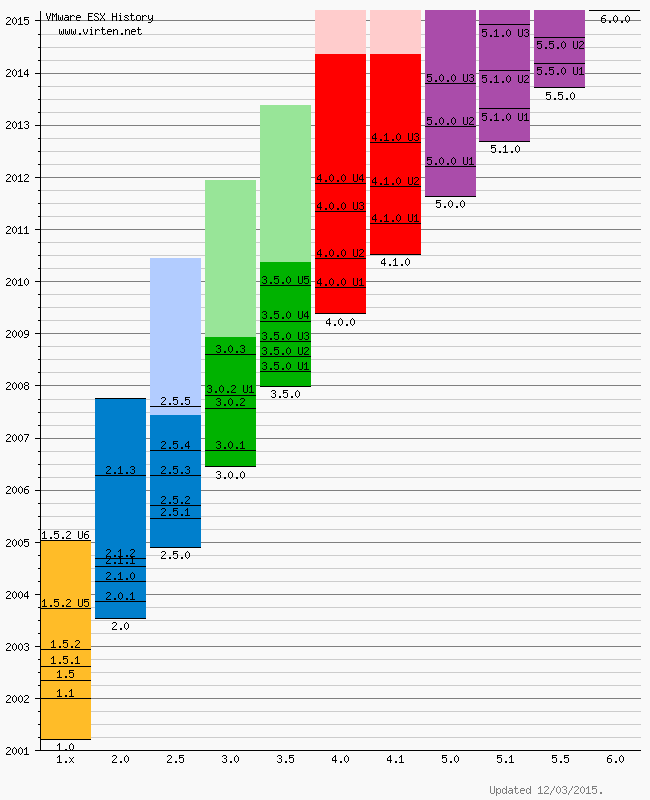
Please note that this is not an official list by VMware. All informations are based on VMware documentation. Some informations or versions are not consistent.
VMware ESXi Release and Build Number History
The following listings are a comprehensive collection of the flagship hypervisor product by VMware. All bold versions are downloadable releases. All patches have been named by their release names. Please note that the ESXi hypervisor was first available with version 3.5.[Last Update: April 9, 2015] –
- vSphere ESXi 6.0
- vSphere ESXi 5.5
- vSphere ESXi 5.1
- vSphere ESXi 5.0
- vSphere ESXi 4.1
- vSphere ESXi 4.0
- ESXi 3.5
- VMware ESX History Diagram
- Download PDF Version
vSphere ESXi 6.0
| Name | Version | Release | Build |
|---|---|---|---|
| ESXi600-201504001 | 2015-04-09 | 2615704 | |
| VMware ESXi 6.0 | ESXi 6.0 GA | 2015-03-12 | 2494585 |
vSphere ESXi 5.5
| Name | Version | Release | Build |
|---|---|---|---|
| ESXi550-201504001 | 2015-04-07 | 2638301 | |
| ESXi550-201502001 | ESXi 5.5 Express Patch 6 | 2015-02-05 | 2456374 |
| ESXi550-201501001 | ESXi 5.5 Patch 4 | 2015-01-27 | 2403361 |
| ESXi550-201412001 | ESXi 5.5 Express Patch 5 | 2014-12-02 | 2302651 |
| ESXi550-201410001 | ESXi 5.5 Patch 3 | 2014-10-15 | 2143827 |
| VMware ESXi 5.5 Update 2 | ESXi 5.5 Update 2 | 2014-09-09 | 2068190 |
| ESXi550-201407001 | ESXi 5.5 Patch 2 | 2014-07-01 | 1892794 |
| ESXi550-201406001 | ESXi 5.5 Express Patch 4 | 2014-06-10 | 1881737 |
| ESXi550-201404020 | ESXi 5.5 Express Patch 3 | 2014-04-19 | 1746974 |
| ESXi550-201404001 | ESXi 5.5 Update 1a | 2014-04-19 | 1746018 |
| VMware ESXi 5.5.1 Driver Rollup | 2014-03-11 | 1636597 | |
| VMware ESXi 5.5 Update 1 | ESXi 5.5 Update 1 | 2014-03-11 | 1623387 |
| ESXi550-201312001 | ESXi 5.5 Patch 1 | 2013-12-22 | 1474528 |
| vSAN Beta Refresh | 2013-11-25 | 1439689 | |
| VMware ESXi 5.5 | ESXi 5.5 GA | 2013-09-22 | 1331820 |
vSphere ESXi 5.1
| Name | Version | Release | Build |
|---|---|---|---|
| ESXi510-201503001 | 5.1.0 Patch 7 | 2015-03-26 | 2583090 |
| VMware ESXi 5.1 Update 3 | 5.1.0 U3 | 2014-12-04 | 2323236 |
| ESXi510-201410001 | 5.1.0 Patch 6 | 2014-10-31 | 2191751 |
| ESXi510-201407001 | 5.1.0 Patch 5 | 2014-07-31 | 2000251 |
| ESXi510-201406001 | 5.1.0 Express Patch 5 | 2014-06-17 | 1900470 |
| ESXi510-201404001 | 5.1.0 Patch 4 | 2014-04-29 | 1743533 |
| ESXi510-201402001 | 5.1.0 Express Patch 4 | 2014-02-27 | 1612806 |
| VMware ESXi 5.1 Update 2 | 5.1.0 U2 | 2014-01-16 | 1483097 |
| ESXi510-201310001 | 5.1.0 Patch 3 | 2013-10-17 | 1312873 |
| ESXi510-201307001 | 5.1.0 Patch 2 | 2013-07-25 | 1157734 |
| ESXi510-201305001 | 5.1.0 Express Patch 3 | 2013-05-22 | 1117900 |
| VMware ESXi 5.1 Update 1 | 5.1.0 U1 | 2013-04-25 | 1065491 |
| ESXi510-201303001 | 5.1.0 Express Patch 2 | 2013-03-07 | 1021289 |
| ESXi510-201212001 | 5.1.0 Patch 1 | 2012-12-20 | 914609 |
| ESXi510-201210001 | 5.1.0a | 2012-10-24 | 838463 |
| KB2034796 | 5.1.0 | Hot-Patch | 837262 |
| VMware ESXi 5.1 | 5.1.0 GA | 2012-09-11 | 799733 |
vSphere ESXi 5.0
| Name | Version | Release | Build |
|---|---|---|---|
| ESXi500-201502001 | 2015-02-26 | 2509828 | |
| ESXi500-201412001 | 5.0.0 Patch 10 | 2014-12-04 | 2312428 |
| ESXi500-201408001 | 5.0.0 Patch 9 | 2014-08-28 | 2000308 |
| ESXi500-201407001 | 5.0.0 Express Patch 6 | 2014-07-01 | 1918656 |
| ESXi500-201405001 | 5.0.0 Patch 8 | 2014-05-29 | 1851670 |
| ESXi500-201401001 | 5.0.0 Patch 7 | 2014-01-23 | 1489271 |
| VMware ESXi 5.0 Update 3 | 5.0.0 U3 | 2013-10-17 | 1311175 |
| ESXi500-201308001 | 5.0.0 Patch 6 | 2013-08-29 | 1254542 |
| ESXi500-201305001 | 5.0.0 Express Patch 5 | 2013-05-15 | 1117897 |
| ESXi500-201303001 | 5.0.0 Patch 5 | 2013-03-28 | 1024429 |
| VMware ESXi 5.0 Update 2 | 5.0.0 U2 | 2012-12-20 | 914586 |
| ESXi500-201209001 | 5.0.0 Patch 4 | 2012-09-27 | 821926 |
| ESXi500-201207001 | 5.0.0 Patch 3 | 2012-07-12 | 768111 |
| ESXi500-201206001 | 5.0.0 Express Patch 4 | 2012-06-14 | 721882 |
| ESXi500-201205001 | 5.0.0 Express Patch 3 | 2012-05-03 | 702118 |
| ESXi500-201204001 | 5.0.0 Express Patch 2 | 2012-04-12 | 653509 |
| VMware ESXi 5.0 Update 1 | 5.0.0 U1 | 2012-03-15 | 623860 |
| ESXi500-201112001 | 5.0.0 Patch 2 | 2011-12-15 | 515841 |
| ESXi500-201111001 | 5.0.0 Express Patch 1 | 2011-11-03 | 504890 |
| ESXi500-201109001 | 5.0.0 Patch 1 | 2011-09-13 | 474610 |
| VMware ESXi 5.0 | 5.0.0 | 2011-08-24 | 469512 |
vSphere ESXi 4.1
| Name | Version | Release | Build |
|---|---|---|---|
| ESXi410-201404001 | 4.1.0 Patch 11 | 2014-04-10 | 1682698 |
| ESXi410-201312001 | 4.1.0 Patch 10 | 2013-12-05 | 1363503 |
| ESXi410-201307001 | 4.1.0 Patch 9 | 2013-07-31 | 1198252 |
| ESXi410-201304001 | 4.1.0 Patch 8 | 2013-04-30 | 1050704 |
| ESXi410-201301001 | 4.1.0 Patch 7 | 2013-01-31 | 988178 |
| ESXi410-201211001 | 4.1.0 Patch 6 | 2012-11-15 | 874690 |
| VMware ESXi 4.1 Update 3 | 4.1.0 U3 | 2012-08-30 | 800380 |
| ESXi410-201206001 | 4.1.0 Express Patch 3 | 2012-06-14 | 721871 |
| ESXi410-201205001 | 4.1.0 Express Patch 2 | 2012-05-03 | 702113 |
| ESXi410-201204001 | 4.1.0 Patch 5 | 2012-04-26 | 659051 |
| ESXi410-201201001 | 4.1.0 Patch 4 | 2012-01-30 | 582267 |
| VMware ESXi 4.1 Update 2 | 4.1.0 U2 | 2011-10-27 | 502767 |
| ESXi410-201107001 | 4.1.0 Patch 3 | 2011-07-28 | 433742 |
| ESXi410-201104001 | 4.1.0 Patch 2 | 2011-04-28 | 381591 |
| VMware ESXi 4.1 Update 1 | 4.1.0 U1 | 2011-02-10 | 348481 |
| ESXi410-201011001 | 4.1.0 Express Patch 1 | 2010-11-29 | 320137 |
| ESXi410-201010001 | 4.1.0 Patch 1 | 2010-11-15 | 320092 |
| VMware ESXi 4.1 | 4.1.0 | 2010-07-13 | 260247 |
vSphere ESXi 4.0
| Name | Version | Release | Build |
|---|---|---|---|
| ESXi400-201404001 | 4.0.0 Patch 20 | 2014-04-10 | 1682696 |
| ESXi400-201310001 | 4.0.0 Patch 19 | 2013-10-24 | 1335992 |
| ESXi400-201305001 | 4.0.0 Patch 18 | 2013-05-30 | 1070634 |
| ESXi400-201302001 | 4.0.0 Patch 17 | 2013-02-07 | 989856 |
| ESXi400-201209001 | 4.0.0 Patch 16 | 2012-09-14 | 787047 |
| ESXi400-201206001 | 4.0.0 Patch 15 | 2012-06-12 | 721907 |
| ESXi400-201205001 | 4.0.0 Patch 14 | 2012-05-03 | 702116 |
| ESXi400-201203001 | 4.0.0 Patch 13 | 2012-03-30 | 660575 |
| VMware ESXi 4.0 Update 4 | 4.0.0 U4 | 2011-11-17 | 504850 |
| ESXi400-201110001 | 4.0.0 Patch 12 | 2011-10-13 | 480973 |
| VMware ESXi 4.0 Update 3 | 4.0.0 U3 | 2011-05-05 | 398348 |
| ESXi400-201104001 | 4.0.0 Patch 11 | 2011-04-28 | 392990 |
| ESXi400-201103001 | 4.0.0 Patch 10 | 2011-03-07 | 360236 |
| ESXi400-201101001 | 4.0.0 Patch 9 | 2011-01-04 | 332073 |
| ESXi400-201009001 | 4.0.0 Patch 8 | 2010-09-30 | 294855 |
| VMware ESXi 4 Update 2 | 4.0.0 U2 | 2010-06-10 | 261974 |
| ESXi400-201005001 | 4.0.0 Patch 7 | 2010-05-27 | 256968 |
| ESXi400-201003001 | 4.0.0 Patch 6 | 2010-04-01 | 244038 |
| ESXi400-201002001 | 4.0.0 Patch 5 | 2010-03-03 | 236512 |
| ESXi400-200912001 | 4.0.0 Patch 4 | 2010-01-05 | 219382 |
| VMware ESXi 4 Update 1 | 4.0.0 U1 | 2009-11-19 | 208167 |
| ESXi400-200909001 | 4.0.0 Patch 3 | 2009-09-24 | 193498 |
| ESXi400-200907001 | 4.0.0 Patch 2 | 2009-08-06 | 181792 |
| ESXi400-200906001 | 4.0.0 Patch 1 | 2009-07-09 | 175625 |
| VMware ESXi 4 | 4.0.0 | 2009-05-21 | 164009 |
ESXi 3.5
| Name | Version | Release | Build |
|---|---|---|---|
| ESXe350-201302401-O-SG | 3.5 Patch 27 | 2013-2-21 | 988599 |
| ESXe350-201206401-O-SG | 3.5 Patch 26 | 2012-06-14 | 725354 |
| ESXe350-201205401-O-SG | 3.5 Patch 25 | 2012-05-03 | 702112 |
| ESXe350-201203401-O-SG | 3.5 Patch 24 | 2012-03-09 | 604481 |
| VMware ESXi 3.5 June 2011 Rollup | 3.5 June 2011 Rollup | 2011-06-30 | 391406 |
| ESXe350-201105401-O-SG | 3.5 Patch 23 | 2011-06-02 | 391406 |
| ESXe350-201012401-O-BG | 3.5 Patch 22 | 2010-12-07 | 317866 |
| ESXe350-201008401-O-SG | 3.5 Patch 21 | 2010-09-01 | 283373 |
| ESXe350-201006401-O-SG | 3.5 Patch 20 | 2010-06-24 | 259926 |
| ESXe350-201003401-O-BG | 3.5 Patch 19 | 2010-03-29 | 238493 |
| ESXe350-201002401-O-SG | 3.5 Patch 18 | 2010-02-16 | 226117 |
| ESXe350-200912401-O-BG | 3.5 Patch 17 | 2009-12-29 | 213532 |
| VMware ESXi 3.5 Update 5 | 3.5 U5 | 2009-12-03 | 207095 |
| ESXe350-200910401-I-SG | 3.5 Patch 16 | 2009-10-16 | 199239 |
| ESXe350-200908401-I-BG | 3.5 Patch 15 | 2009-08-31 | 184236 |
| ESXe350-200907401-I-BG | 3.5 Patch 14 | 2009-07-30 | 176894 |
| ESXe350-200906401-I-BG | 3.5 Patch 13 | 2009-06-30 | 169697 |
| ESXe350-200905401-I-BG | 3.5 Patch 12 | 2009-05-28 | 163429 |
| ESXe350-200904401-I-SG | 3.5 Patch 11 | 2009-04-29 | 158874 |
| VMware ESXi 3.5 Update 4 | 3.5 U4 | 2009-03-30 | 153875 |
| ESXe350-200903411-I-BG | 3.5 Patch 10 | 2009-03-20 | 153480 |
| ESXe350-200901401-I-SG | 3.5 Patch 9 | 2009-01-30 | 143129 |
| ESXe350-200811401-I-SG | 3.5 Patch 8 | 2008-12-02 | 130755 |
| VMware ESXi 3.5 Update 3 | 3.5 U3 | 2008-11-06 | 123629 |
| ESXe350-200809401-I-SG | 3.5 Patch 7 | 2008-10-03 | 120505 |
| ESXe350-200808501-I-SG | 3.5 Patch 6 | 2008-09-18 | 113338 |
| VMware ESXi 3.5 Update 2 (reissued) | 3.5 U2 | 2008-08-13 | 110271 |
| ESXe350-200807812-I-BG | 3.5 Patch 5 | 2008-08-12 | 110180 |
| VMware ESXi 3.5 Update 2 (timebombed) | 3.5 U2 | 2008-07-25 | 103909 |
| ESXe350-200805501-I-SG | 3.5 Patch 4 | 2008-06-03 | 94430 |
| ESXe350-200804401-O-BG | 3.5 Patch 3 | 2008-04-30 | 85332 |
| VMware ESXi 3.5 Update 1 | 3.5 U1 | 2008-04-10 | 82664 |
| ESXe350-200802401-I-BG | 3.5 Patch 2 | 2008-03-10 | 76563 |
| ESXe350-200712401-O-BG | 3.5 Patch 1 | 2008-01-17 | |
| VMware ESXi 3.5 Initial Release | 3.5 | 2008-01-10 | 70348 |
| VMware ESXi 3.5 First Public Release | 3.5 | 2007-12-31 | 67921 |
VMware ESX History Diagram
Please note that this is not an official list by VMware. All informations are based on VMware documentation. Some informations or versions are not consistent.
Manually Download VMware Tools ISO Image
This post is to share the
information about How to manually download the VMware tools for various
Operation system based on VMware vSphere versions. VMware tools varies
for each and every operating system. When we try to install or Upgrade
VMware tools using vSphere client, It will automatically mount the
associated VMware tools ISO into virtual CD ROM drive of your virtual
machine based on the Guest Operating system of the virtual machine. If
in case you face any problem with mounting VMware tools ISO image to the
virtual machine using vSphere client, you can manually download the
VMware tools from the VMware website and install it manually.


You can even download the complete list of VMware tools available
for various operating systems and place it in your organization
repository to be used by administrators. It will make your job easy.
VMware tools helps to optimize the performance of your virtual machine
using ESX/ESXi hypervisor resource management mechanisms.
Using the above link you can Select the version of vSphere to download the VMware tools. I have Selected ESXi 5.1 U1
After
selecting the ESX/ESXi version, It will allow us to select the Operating
system to download the respective VMware tools version
I have selected Windows in the above section and intern it will ask
you to select either 32 bit or 64 bit of VMware tools version for the
windows operating system.
Choose
either X64 or X86 based on your operating system of the Virtual Machine.
It will allow you to download VMware tools .exe file and also VMware
tools ISO image.
Thats it.
You are done with the manual download of VMware tools for your guest
operating system. I hope this post is informative for you. Thanks for
Reading !!!
Monday, March 30, 2015
High Disk Space is being consumed by C:\Program Files\Symantec\Symantec Endpoint Protection Manager\data\outbox\Importpackage
. Delete all files from %installlocation%\Symantec\Symantec Endpoint
Protection Manager\data\outbox\ImportPackage folder. (without stopping
any services)
2. Delete everything older than today's date in %installlocation%\Symantec\Symantec Endpoint Protection Manager\Inetpub\content (also without stopping any services)
3. In the Symantec Admin Console go to Admin > Servers > localhost. Right-click localhost and truncate the transaction logs.
Symantec has released new version of Symantec Endpoint Protection. English versions of Symantec Endpoint Protection 12.1.5337.5000 (RU5) is now available.
It has new content storage optimization feature:
As part of the upgrade to SEPM 12.1 RU5, the SEPM converts all of the content from full definitions to delta definitions. This process is resource intensive and may take an extended period of time. After this process is completed, the SEPM will use significantly less disk space.
In a typical enterprise setup where 30 content revisions stored, the SEPM upgrade process must reduce 55GB of full content to under 2GB of delta content. This process requires significant resources to complete and is impacted by the performance of any available CPUs, CPU cores (physical/logical/hyperthreading), memory, and disks (I/O). On a server that performs multiple roles, stores larger numbers of content, or is otherwise resource constrained, this process may take a longer duration to complete.
Refer this article to find more info: The LiveUpdate content optimization and content storage space optimization steps take a long time to complete when upgrading to Symantec Endpoint Protection Manager 12.1 RU5
http://www.symantec.com/docs/TECH224055
2. Delete everything older than today's date in %installlocation%\Symantec\Symantec Endpoint Protection Manager\Inetpub\content (also without stopping any services)
3. In the Symantec Admin Console go to Admin > Servers > localhost. Right-click localhost and truncate the transaction logs.
Symantec has released new version of Symantec Endpoint Protection. English versions of Symantec Endpoint Protection 12.1.5337.5000 (RU5) is now available.
It has new content storage optimization feature:
As part of the upgrade to SEPM 12.1 RU5, the SEPM converts all of the content from full definitions to delta definitions. This process is resource intensive and may take an extended period of time. After this process is completed, the SEPM will use significantly less disk space.
In a typical enterprise setup where 30 content revisions stored, the SEPM upgrade process must reduce 55GB of full content to under 2GB of delta content. This process requires significant resources to complete and is impacted by the performance of any available CPUs, CPU cores (physical/logical/hyperthreading), memory, and disks (I/O). On a server that performs multiple roles, stores larger numbers of content, or is otherwise resource constrained, this process may take a longer duration to complete.
Refer this article to find more info: The LiveUpdate content optimization and content storage space optimization steps take a long time to complete when upgrading to Symantec Endpoint Protection Manager 12.1 RU5
http://www.symantec.com/docs/TECH224055
Thursday, March 12, 2015
vCenter Server Appliance: Troubleshooting full database partition
A customer of mine had within 6 months
twice a full database partition on a VMware vCenter Server
Appliance. After the first outage, the customer increased the size of
the partition which is mounted to /storage/db. Some months later, some
days ago, the vCSA became unresponsive again. Again because of a filled
up database partition. The customer increased the size of the database
partition again (~ 200 GB!!) and today I had time to take a look at
this nasty vCSA.
The situation

Within 2 days, the storage usage of the databse increased from 75% to 77%. First, I checked the size of the database:
|
1
2
3
4
5
6
7
8
9
10
11
12
13
14
|
vcsa:/opt/vmware/vpostgres/current/bin # /opt/vmware/vpostgres/current/bin/psql -h localhost -U vc VCDB
psql.bin (9.0.17)
Type "help" for help.
VCDB=> SELECT pg_database.datname, pg_size_pretty(pg_database_size(pg_database.datname)) AS size FROM pg_database;
datname | size
-----------+---------
template1 | 5353 kB
template0 | 5345 kB
postgres | 5449 kB
VCDB | 2007 MB
(4 rows)
VCDB=>
|
As you can see, the database had only 2 GB. The pg_log directory was more interesting:
|
1
2
3
4
5
6
7
8
9
10
11
12
13
14
15
16
17
18
19
20
|
vcsa:/storage/db/vpostgres # du -shc /storage/db/vpostgres/*
4.0K /storage/db/vpostgres/PG_VERSION
2.0G /storage/db/vpostgres/base
704K /storage/db/vpostgres/global
47M /storage/db/vpostgres/pg_clog
4.0K /storage/db/vpostgres/pg_hba.conf
4.0K /storage/db/vpostgres/pg_ident.conf
<strong>141G /storage/db/vpostgres/pg_log</strong>
252K /storage/db/vpostgres/pg_multixact
12K /storage/db/vpostgres/pg_notify
324K /storage/db/vpostgres/pg_stat_tmp
20K /storage/db/vpostgres/pg_subtrans
4.0K /storage/db/vpostgres/pg_tblspc
4.0K /storage/db/vpostgres/pg_twophase
81M /storage/db/vpostgres/pg_xlog
20K /storage/db/vpostgres/postgresql.conf
4.0K /storage/db/vpostgres/postmaster.opts
4.0K /storage/db/vpostgres/postmaster.pid
0 /storage/db/vpostgres/serverlog
143G total
|
The directory was full with log files. The log files containted only one message:
|
1
2
|
vcsa:/storage/db/vpostgres/pg_log # more postgresql-2015-03-04_090525.log
123462 tm:2015-03-04 09:05:25.488 UTC db:VCDB pid:1527 WARNING: there is already a transaction in progress
|
The solution
This led me to VMware KB2092127
(After upgrading to vCenter Server Appliance 5.5 Update 2, pg_log file
reports this error: WARNING: there is already a transaction in
progress). And yes, this appliance was upgraded to U2 with high
probability. The solution is described in KB2092127, and is really easy
to implement. Please note that this is only a workaround. There’s
currently no solution, as mentioned in the article.
How to connect/interact with VCVA DB (DB2 and vPostgres)
If
you need to connect/interact with the VC appliance database, for
example to remove the locks of DB2 or performing an script, you can do
the following after being logged in as root via SSH on the appliance:
- On VCVA 5.0 GA with DB2:
1. Turn into the db2inst user:
vcenter:/ # su db2inst1
2. Start the db2 client:
db2inst1@vcenter:/> db2
You'll see a prompt like this:
db2 =>
3. connect to the VCDB database:
db2 => connect to VCDB
(the command is like this, very literal)
4. Change to VC schema:
db2 => set schema vc
5. Perform any command you need. For example, to remove the VPX_SESSIONLOCK lines, you can do like this:
db2 => delete from VPX_SESSIONLOCK
DB20000I The SQL command completed successfully.
You can type "quit" anytime you want to exit from the db2 client, and "exit" when you want to go back to root userspace.
- On VCVA with vPostgres:
1. Connect to the database using psql:
vcenter:/ # /opt/vmware/vpostgres/1.0/bin/psql -U vc -d VCDB
You'll see a prompt like this:
psql (9.0.4)
Type "help" for help.
VCDB=>
2. Perform any command you need (selects, inserts, etc). For example, to list all tables:
VCDB=> \dt
There are a lot of new tables in 5.1, (mainly the vpx_hist_stat* ones).
To quit, just type "\q"
DB20000I The SQL command completed successfully.
Type "help" for help.
Subscribe to:
Posts (Atom)