Wednesday, August 12, 2015
Retired Certification Exams
Here you can check for the Cisco retired exams.
http://www.cisco.com/web/learning/exams/retired.html

Cisco IP Phone 8811_8841_8851_8861 Administration

Basic Reset
Performing a basic reset of a Cisco IP Phone provides a way to recover if the phone experiences an error and provides a way to reset or restore various configuration and security settings.
The following table describes the ways to perform a basic reset. You can reset a phone with any of these operations after the phone has started up. Choose the operation that is appropriate for your situation.
Operation
|
Action
|
Explanation
|
|---|---|---|
Restart phone
|
Press Services, Applications, or Directoriesand then press **#**.
|
Resets any user and network setup changes that you have made, but that the phone has not written to its Flash memory, to previously saved settings, then restarts the phone.
|
Reset settings
|
To reset settings, press Applications and choose .
|
Resets user and network setup settings to their default values, and restarts the phone.
|
To reset the CTL file, press Applications and choose .
|
Resets the CTL file.
|
Perform Factory Reset from Phone Keypad
Procedure
mRemoteNG Serial Connection
mRemoteNG Serial Connection
Its is impossible to simply create a serial connection on mRemoteNG ( a least at 1.67 version) so there is a tip to do that.
1 Using Putty Session
- Download putty.exe and copy it so somewhere ( example to "C:\1")
- Open putty.exe, create Serial Connection, and save it.Dont forget to choose baud rate ( example "COM_9600")
- Open mRemoteNG go to external tools (Tools-External Tools), create new external tool ( example "PTTY_9600")
- At the filename write path+filename ( example "C:\1\putty.exe")
- At the argumets write putty.exe -load "CONNECTION_NAME) ( example "putty.exe -load "COM_9600")
- Choose "Try to integrate" Option
- Create new connection and in the protocol filed choose "Ext. App" then External tool "PTTY_9600" ( external tool name)
2 - Using TeraTerm
- install teratem ( i use v 4.70)
- Create external tool, name it ( example TTRM_9600)
- At the filename write path+filename ( example "C:\Program Files\teraterm\ttermpro.exe")
- At the argumets write "ttermpro.exe /BAUD=9600 /C=1"
(/BAUD is baud rate and /C is COM port number)
- Choose "Try to integrate" Option
- Create new connection and in the protocol filed choose "Ext. App" then External tool "TTRM_9600" ( external tool name)
Enjoy!
mRemoteNG FileZilla SFTP
How to integrate FileZilla SFTP support in mRemoteNG.
First open up mRemoteNG then press “tools” and then “External Tools”

Right click and select “New External Tool”

In the External Tools Properties tab, enter the following:
Filename: C:\Program Files (x86)\FileZilla FTP Client\filezilla.exe
Arguments: sftp://%Username%:%Password%@%Hostname%:%port%

After that you should be all set, just right click the connection you want to connect via STFP and FileZilla should automatically open.
First open up mRemoteNG then press “tools” and then “External Tools”
Right click and select “New External Tool”
In the External Tools Properties tab, enter the following:
Filename: C:\Program Files (x86)\FileZilla FTP Client\filezilla.exe
Arguments: sftp://%Username%:%Password%@%Hostname%:%port%
After that you should be all set, just right click the connection you want to connect via STFP and FileZilla should automatically open.
Thursday, April 16, 2015
Windows 8.1/Windows Server 2012R2 virtual machines fail with a blue screen and report the error: CRITICAL_STRUCTURE_CORRUPTION (2060019)
Applied workaround and confirmed working!
http://kb.vmware.com/selfservice/microsites/search.do?language=en_US&cmd=displayKC&externalId=2060019
http://kb.vmware.com/selfservice/microsites/search.do?language=en_US&cmd=displayKC&externalId=2060019
Windows 8.1/Windows Server 2012R2 virtual machines fail with a blue screen and report the error: CRITICAL_STRUCTURE_CORRUPTION (2060019)
Wednesday, April 15, 2015
VMware ESXi Release and Build Number History
http://www.virten.net/vmware/esxi-release-build-number-history/#esxi5.0
[Last Update: April 9, 2015] –
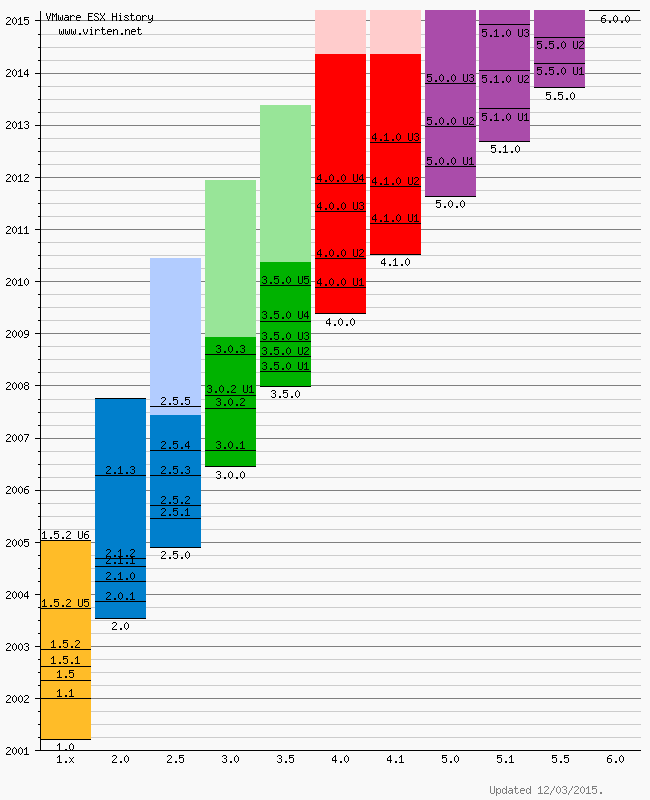
Please note that this is not an official list by VMware. All informations are based on VMware documentation. Some informations or versions are not consistent.
VMware ESXi Release and Build Number History
The following listings are a comprehensive collection of the flagship hypervisor product by VMware. All bold versions are downloadable releases. All patches have been named by their release names. Please note that the ESXi hypervisor was first available with version 3.5.[Last Update: April 9, 2015] –
- vSphere ESXi 6.0
- vSphere ESXi 5.5
- vSphere ESXi 5.1
- vSphere ESXi 5.0
- vSphere ESXi 4.1
- vSphere ESXi 4.0
- ESXi 3.5
- VMware ESX History Diagram
- Download PDF Version
vSphere ESXi 6.0
| Name | Version | Release | Build |
|---|---|---|---|
| ESXi600-201504001 | 2015-04-09 | 2615704 | |
| VMware ESXi 6.0 | ESXi 6.0 GA | 2015-03-12 | 2494585 |
vSphere ESXi 5.5
| Name | Version | Release | Build |
|---|---|---|---|
| ESXi550-201504001 | 2015-04-07 | 2638301 | |
| ESXi550-201502001 | ESXi 5.5 Express Patch 6 | 2015-02-05 | 2456374 |
| ESXi550-201501001 | ESXi 5.5 Patch 4 | 2015-01-27 | 2403361 |
| ESXi550-201412001 | ESXi 5.5 Express Patch 5 | 2014-12-02 | 2302651 |
| ESXi550-201410001 | ESXi 5.5 Patch 3 | 2014-10-15 | 2143827 |
| VMware ESXi 5.5 Update 2 | ESXi 5.5 Update 2 | 2014-09-09 | 2068190 |
| ESXi550-201407001 | ESXi 5.5 Patch 2 | 2014-07-01 | 1892794 |
| ESXi550-201406001 | ESXi 5.5 Express Patch 4 | 2014-06-10 | 1881737 |
| ESXi550-201404020 | ESXi 5.5 Express Patch 3 | 2014-04-19 | 1746974 |
| ESXi550-201404001 | ESXi 5.5 Update 1a | 2014-04-19 | 1746018 |
| VMware ESXi 5.5.1 Driver Rollup | 2014-03-11 | 1636597 | |
| VMware ESXi 5.5 Update 1 | ESXi 5.5 Update 1 | 2014-03-11 | 1623387 |
| ESXi550-201312001 | ESXi 5.5 Patch 1 | 2013-12-22 | 1474528 |
| vSAN Beta Refresh | 2013-11-25 | 1439689 | |
| VMware ESXi 5.5 | ESXi 5.5 GA | 2013-09-22 | 1331820 |
vSphere ESXi 5.1
| Name | Version | Release | Build |
|---|---|---|---|
| ESXi510-201503001 | 5.1.0 Patch 7 | 2015-03-26 | 2583090 |
| VMware ESXi 5.1 Update 3 | 5.1.0 U3 | 2014-12-04 | 2323236 |
| ESXi510-201410001 | 5.1.0 Patch 6 | 2014-10-31 | 2191751 |
| ESXi510-201407001 | 5.1.0 Patch 5 | 2014-07-31 | 2000251 |
| ESXi510-201406001 | 5.1.0 Express Patch 5 | 2014-06-17 | 1900470 |
| ESXi510-201404001 | 5.1.0 Patch 4 | 2014-04-29 | 1743533 |
| ESXi510-201402001 | 5.1.0 Express Patch 4 | 2014-02-27 | 1612806 |
| VMware ESXi 5.1 Update 2 | 5.1.0 U2 | 2014-01-16 | 1483097 |
| ESXi510-201310001 | 5.1.0 Patch 3 | 2013-10-17 | 1312873 |
| ESXi510-201307001 | 5.1.0 Patch 2 | 2013-07-25 | 1157734 |
| ESXi510-201305001 | 5.1.0 Express Patch 3 | 2013-05-22 | 1117900 |
| VMware ESXi 5.1 Update 1 | 5.1.0 U1 | 2013-04-25 | 1065491 |
| ESXi510-201303001 | 5.1.0 Express Patch 2 | 2013-03-07 | 1021289 |
| ESXi510-201212001 | 5.1.0 Patch 1 | 2012-12-20 | 914609 |
| ESXi510-201210001 | 5.1.0a | 2012-10-24 | 838463 |
| KB2034796 | 5.1.0 | Hot-Patch | 837262 |
| VMware ESXi 5.1 | 5.1.0 GA | 2012-09-11 | 799733 |
vSphere ESXi 5.0
| Name | Version | Release | Build |
|---|---|---|---|
| ESXi500-201502001 | 2015-02-26 | 2509828 | |
| ESXi500-201412001 | 5.0.0 Patch 10 | 2014-12-04 | 2312428 |
| ESXi500-201408001 | 5.0.0 Patch 9 | 2014-08-28 | 2000308 |
| ESXi500-201407001 | 5.0.0 Express Patch 6 | 2014-07-01 | 1918656 |
| ESXi500-201405001 | 5.0.0 Patch 8 | 2014-05-29 | 1851670 |
| ESXi500-201401001 | 5.0.0 Patch 7 | 2014-01-23 | 1489271 |
| VMware ESXi 5.0 Update 3 | 5.0.0 U3 | 2013-10-17 | 1311175 |
| ESXi500-201308001 | 5.0.0 Patch 6 | 2013-08-29 | 1254542 |
| ESXi500-201305001 | 5.0.0 Express Patch 5 | 2013-05-15 | 1117897 |
| ESXi500-201303001 | 5.0.0 Patch 5 | 2013-03-28 | 1024429 |
| VMware ESXi 5.0 Update 2 | 5.0.0 U2 | 2012-12-20 | 914586 |
| ESXi500-201209001 | 5.0.0 Patch 4 | 2012-09-27 | 821926 |
| ESXi500-201207001 | 5.0.0 Patch 3 | 2012-07-12 | 768111 |
| ESXi500-201206001 | 5.0.0 Express Patch 4 | 2012-06-14 | 721882 |
| ESXi500-201205001 | 5.0.0 Express Patch 3 | 2012-05-03 | 702118 |
| ESXi500-201204001 | 5.0.0 Express Patch 2 | 2012-04-12 | 653509 |
| VMware ESXi 5.0 Update 1 | 5.0.0 U1 | 2012-03-15 | 623860 |
| ESXi500-201112001 | 5.0.0 Patch 2 | 2011-12-15 | 515841 |
| ESXi500-201111001 | 5.0.0 Express Patch 1 | 2011-11-03 | 504890 |
| ESXi500-201109001 | 5.0.0 Patch 1 | 2011-09-13 | 474610 |
| VMware ESXi 5.0 | 5.0.0 | 2011-08-24 | 469512 |
vSphere ESXi 4.1
| Name | Version | Release | Build |
|---|---|---|---|
| ESXi410-201404001 | 4.1.0 Patch 11 | 2014-04-10 | 1682698 |
| ESXi410-201312001 | 4.1.0 Patch 10 | 2013-12-05 | 1363503 |
| ESXi410-201307001 | 4.1.0 Patch 9 | 2013-07-31 | 1198252 |
| ESXi410-201304001 | 4.1.0 Patch 8 | 2013-04-30 | 1050704 |
| ESXi410-201301001 | 4.1.0 Patch 7 | 2013-01-31 | 988178 |
| ESXi410-201211001 | 4.1.0 Patch 6 | 2012-11-15 | 874690 |
| VMware ESXi 4.1 Update 3 | 4.1.0 U3 | 2012-08-30 | 800380 |
| ESXi410-201206001 | 4.1.0 Express Patch 3 | 2012-06-14 | 721871 |
| ESXi410-201205001 | 4.1.0 Express Patch 2 | 2012-05-03 | 702113 |
| ESXi410-201204001 | 4.1.0 Patch 5 | 2012-04-26 | 659051 |
| ESXi410-201201001 | 4.1.0 Patch 4 | 2012-01-30 | 582267 |
| VMware ESXi 4.1 Update 2 | 4.1.0 U2 | 2011-10-27 | 502767 |
| ESXi410-201107001 | 4.1.0 Patch 3 | 2011-07-28 | 433742 |
| ESXi410-201104001 | 4.1.0 Patch 2 | 2011-04-28 | 381591 |
| VMware ESXi 4.1 Update 1 | 4.1.0 U1 | 2011-02-10 | 348481 |
| ESXi410-201011001 | 4.1.0 Express Patch 1 | 2010-11-29 | 320137 |
| ESXi410-201010001 | 4.1.0 Patch 1 | 2010-11-15 | 320092 |
| VMware ESXi 4.1 | 4.1.0 | 2010-07-13 | 260247 |
vSphere ESXi 4.0
| Name | Version | Release | Build |
|---|---|---|---|
| ESXi400-201404001 | 4.0.0 Patch 20 | 2014-04-10 | 1682696 |
| ESXi400-201310001 | 4.0.0 Patch 19 | 2013-10-24 | 1335992 |
| ESXi400-201305001 | 4.0.0 Patch 18 | 2013-05-30 | 1070634 |
| ESXi400-201302001 | 4.0.0 Patch 17 | 2013-02-07 | 989856 |
| ESXi400-201209001 | 4.0.0 Patch 16 | 2012-09-14 | 787047 |
| ESXi400-201206001 | 4.0.0 Patch 15 | 2012-06-12 | 721907 |
| ESXi400-201205001 | 4.0.0 Patch 14 | 2012-05-03 | 702116 |
| ESXi400-201203001 | 4.0.0 Patch 13 | 2012-03-30 | 660575 |
| VMware ESXi 4.0 Update 4 | 4.0.0 U4 | 2011-11-17 | 504850 |
| ESXi400-201110001 | 4.0.0 Patch 12 | 2011-10-13 | 480973 |
| VMware ESXi 4.0 Update 3 | 4.0.0 U3 | 2011-05-05 | 398348 |
| ESXi400-201104001 | 4.0.0 Patch 11 | 2011-04-28 | 392990 |
| ESXi400-201103001 | 4.0.0 Patch 10 | 2011-03-07 | 360236 |
| ESXi400-201101001 | 4.0.0 Patch 9 | 2011-01-04 | 332073 |
| ESXi400-201009001 | 4.0.0 Patch 8 | 2010-09-30 | 294855 |
| VMware ESXi 4 Update 2 | 4.0.0 U2 | 2010-06-10 | 261974 |
| ESXi400-201005001 | 4.0.0 Patch 7 | 2010-05-27 | 256968 |
| ESXi400-201003001 | 4.0.0 Patch 6 | 2010-04-01 | 244038 |
| ESXi400-201002001 | 4.0.0 Patch 5 | 2010-03-03 | 236512 |
| ESXi400-200912001 | 4.0.0 Patch 4 | 2010-01-05 | 219382 |
| VMware ESXi 4 Update 1 | 4.0.0 U1 | 2009-11-19 | 208167 |
| ESXi400-200909001 | 4.0.0 Patch 3 | 2009-09-24 | 193498 |
| ESXi400-200907001 | 4.0.0 Patch 2 | 2009-08-06 | 181792 |
| ESXi400-200906001 | 4.0.0 Patch 1 | 2009-07-09 | 175625 |
| VMware ESXi 4 | 4.0.0 | 2009-05-21 | 164009 |
ESXi 3.5
| Name | Version | Release | Build |
|---|---|---|---|
| ESXe350-201302401-O-SG | 3.5 Patch 27 | 2013-2-21 | 988599 |
| ESXe350-201206401-O-SG | 3.5 Patch 26 | 2012-06-14 | 725354 |
| ESXe350-201205401-O-SG | 3.5 Patch 25 | 2012-05-03 | 702112 |
| ESXe350-201203401-O-SG | 3.5 Patch 24 | 2012-03-09 | 604481 |
| VMware ESXi 3.5 June 2011 Rollup | 3.5 June 2011 Rollup | 2011-06-30 | 391406 |
| ESXe350-201105401-O-SG | 3.5 Patch 23 | 2011-06-02 | 391406 |
| ESXe350-201012401-O-BG | 3.5 Patch 22 | 2010-12-07 | 317866 |
| ESXe350-201008401-O-SG | 3.5 Patch 21 | 2010-09-01 | 283373 |
| ESXe350-201006401-O-SG | 3.5 Patch 20 | 2010-06-24 | 259926 |
| ESXe350-201003401-O-BG | 3.5 Patch 19 | 2010-03-29 | 238493 |
| ESXe350-201002401-O-SG | 3.5 Patch 18 | 2010-02-16 | 226117 |
| ESXe350-200912401-O-BG | 3.5 Patch 17 | 2009-12-29 | 213532 |
| VMware ESXi 3.5 Update 5 | 3.5 U5 | 2009-12-03 | 207095 |
| ESXe350-200910401-I-SG | 3.5 Patch 16 | 2009-10-16 | 199239 |
| ESXe350-200908401-I-BG | 3.5 Patch 15 | 2009-08-31 | 184236 |
| ESXe350-200907401-I-BG | 3.5 Patch 14 | 2009-07-30 | 176894 |
| ESXe350-200906401-I-BG | 3.5 Patch 13 | 2009-06-30 | 169697 |
| ESXe350-200905401-I-BG | 3.5 Patch 12 | 2009-05-28 | 163429 |
| ESXe350-200904401-I-SG | 3.5 Patch 11 | 2009-04-29 | 158874 |
| VMware ESXi 3.5 Update 4 | 3.5 U4 | 2009-03-30 | 153875 |
| ESXe350-200903411-I-BG | 3.5 Patch 10 | 2009-03-20 | 153480 |
| ESXe350-200901401-I-SG | 3.5 Patch 9 | 2009-01-30 | 143129 |
| ESXe350-200811401-I-SG | 3.5 Patch 8 | 2008-12-02 | 130755 |
| VMware ESXi 3.5 Update 3 | 3.5 U3 | 2008-11-06 | 123629 |
| ESXe350-200809401-I-SG | 3.5 Patch 7 | 2008-10-03 | 120505 |
| ESXe350-200808501-I-SG | 3.5 Patch 6 | 2008-09-18 | 113338 |
| VMware ESXi 3.5 Update 2 (reissued) | 3.5 U2 | 2008-08-13 | 110271 |
| ESXe350-200807812-I-BG | 3.5 Patch 5 | 2008-08-12 | 110180 |
| VMware ESXi 3.5 Update 2 (timebombed) | 3.5 U2 | 2008-07-25 | 103909 |
| ESXe350-200805501-I-SG | 3.5 Patch 4 | 2008-06-03 | 94430 |
| ESXe350-200804401-O-BG | 3.5 Patch 3 | 2008-04-30 | 85332 |
| VMware ESXi 3.5 Update 1 | 3.5 U1 | 2008-04-10 | 82664 |
| ESXe350-200802401-I-BG | 3.5 Patch 2 | 2008-03-10 | 76563 |
| ESXe350-200712401-O-BG | 3.5 Patch 1 | 2008-01-17 | |
| VMware ESXi 3.5 Initial Release | 3.5 | 2008-01-10 | 70348 |
| VMware ESXi 3.5 First Public Release | 3.5 | 2007-12-31 | 67921 |
VMware ESX History Diagram
Please note that this is not an official list by VMware. All informations are based on VMware documentation. Some informations or versions are not consistent.
Manually Download VMware Tools ISO Image
This post is to share the
information about How to manually download the VMware tools for various
Operation system based on VMware vSphere versions. VMware tools varies
for each and every operating system. When we try to install or Upgrade
VMware tools using vSphere client, It will automatically mount the
associated VMware tools ISO into virtual CD ROM drive of your virtual
machine based on the Guest Operating system of the virtual machine. If
in case you face any problem with mounting VMware tools ISO image to the
virtual machine using vSphere client, you can manually download the
VMware tools from the VMware website and install it manually.


You can even download the complete list of VMware tools available
for various operating systems and place it in your organization
repository to be used by administrators. It will make your job easy.
VMware tools helps to optimize the performance of your virtual machine
using ESX/ESXi hypervisor resource management mechanisms.
Using the above link you can Select the version of vSphere to download the VMware tools. I have Selected ESXi 5.1 U1
After
selecting the ESX/ESXi version, It will allow us to select the Operating
system to download the respective VMware tools version
I have selected Windows in the above section and intern it will ask
you to select either 32 bit or 64 bit of VMware tools version for the
windows operating system.
Choose
either X64 or X86 based on your operating system of the Virtual Machine.
It will allow you to download VMware tools .exe file and also VMware
tools ISO image.
Thats it.
You are done with the manual download of VMware tools for your guest
operating system. I hope this post is informative for you. Thanks for
Reading !!!
Subscribe to:
Posts (Atom)